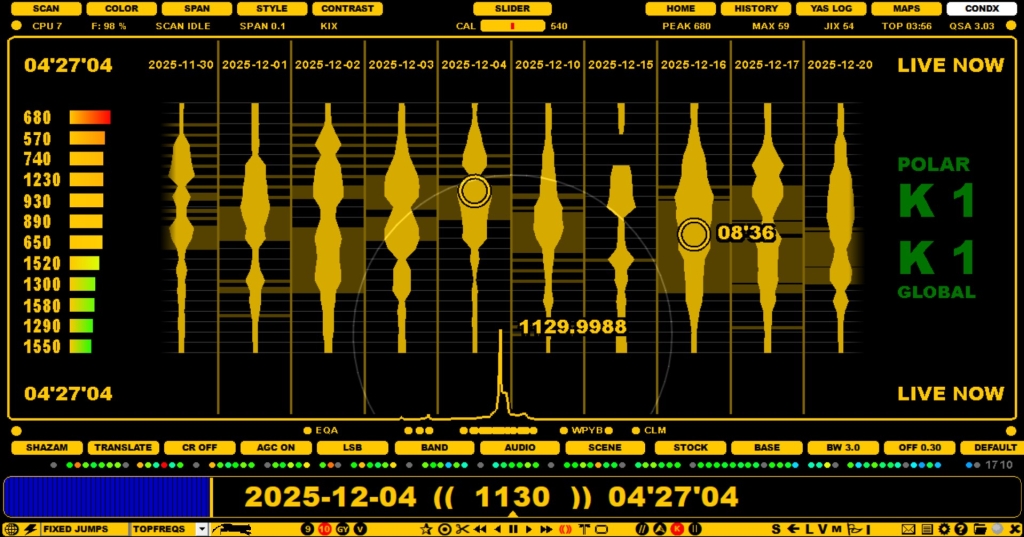
MW STATS is a useful platform for navigation, evaluation and control of your DX days and recordings. The MW STATS display shows the DX DAYs, DX signal powers on those days (either for MW9 or MW10, based on the current stepping) and the recorded times on each day. MW STATS also offers tools to delete files and/or full days and also a tool to add a marker for a "good DX day".
In addition to the DX DAYS, the MW STATS display shows the STRONGEST frequencies at the playback time (on the left side) and the current LIVE cx data (on the right side).
If you have used the keyboard key "V" (= VALUABLE file) for marking files with "extraordinary DX loggings", those "golden files" can be seen as yellow areas on this display,

MW STATS is also linked to the VSTORE system (see VSTORE for details): if VSTORE is enabled, you can manually move a DX DAY to the VSTORE
You can use MW STATS for jumping to any recorded HH'MM by clicking the time pointed by the mouse cursor. Days can be scrolled left/right using the mouse wheel and/or left/right arrow keys.
The right click ZOOM (on/off) can be used to display the DAYLOGs instead of the STRONGEST column.
Click SLIDER > CONDX, clicking again you can toggle between CX STATS and MW STATS.
If you move the mouse cursor over the day title, the pointed day will turn red.

Clicking the red day title triggers a small popup menu.
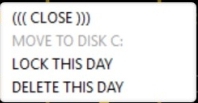
From this menu you can do the following actions for the selected day:
Clicking the a day with a "KEEP" tag allows only one action ("UNLOCK THIS DAY").
In addition, you can paint files within a day for deletion: move the mouse cursor over the desired day, keep the left mouse button down for a while ("DELETE" banner will appear) and paint an area. When releasing the paint, the system asks if you really want to delete these files.
