
POWERBOX is recommended as the first navigation tool for new JAGUAR users. Often with SDR applications large amounts of recorded files generate a new problem: how to find out where do we have "good signals" and how to navigate quickly to those times and/or to those frequencies. POWERBOX offers a simple and handy platform for jumping to any desired HH:MM (the desired new time is pointed by the mouse cursor).
POWERBOX can be opened/closed by clicking one of the round corner buttons (the one on the right side up on the screen). POWERBOX can also be closed by right-clicking the POWERBOX.
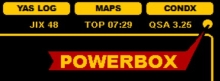
POWERBOX shows the signal history for the current playback frequency for the recorded times on the current playback day. The signal strengths are shown by a colored ball for each HH:MM. These colors correspond the YAS LOG colors (so tuning the YAS LOG's color CONTRAST changes also the color of these balls).
You can jump to any recorded HH:MM by clicking the ball. The current playback position is shown by a small circle.
When the POWERBOX is active, you can still change the playback frequency from outside the POWERBOX. In that case, you will be automatically directed to the HH:MM position shown by the HIGHEST signal strength HH:MM.