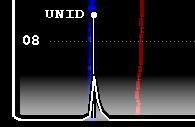
There are two types of offsets in JAGUAR: global ("public") and local ("private"). Global offsets are presented as FLAGS (see GUIDE > FLAGS for more details), local offsets are presented as short pins on the bottom of the graphics area and they can be regarded as "user's private offset collection".
We highly recommend to share your offset observations with other users, that's the essential idea in using the offsets in MW DXing. The goal is to collect and share a lot of timestamped offset data so that in the future we'll get better matching offset displays, including "offset history" in a visual format. That's why the public offset logging has been made as easy as possible: just drag the flag with your mouse to the correct carrier location. The more reliable time specific offset information we'll get for the JAGUAR displays, the more successful our DX results will become in the future.
However, if you prefer to collect/maintain only your own offset list locally, this is also possible.
The local offset pins are visible on all JAGUAR displays except CONDX.
If you want to keep track of your "own offsets" presented as pins, please enable
SETTINGS > OFFSETS > MY_OFFSETS > YES (this is NO by default).
If MY_OFFSETS is activated, your global offset modifications (see GUIDE > OFFSETS for details) are updated also to a local text file (OFFSET.txt) and you'll see the contents of that file as pins when you tune to a frequency which contains entries in this file for that tuned frequency. This file is saved/maintained in the Jaguar installation folder, so you can edit that file also manually, either using the standard Notepad or TOOLBAR > TEXTPADS > OFFSETS.

The OFFSET.txt file contains "frequency (with four decimals), short name (max 9 chars)"-pairs, one pair per line, for example
1240.0022, KDLR
Editing this file is straightforward and this way you can maintain your own offset collection without making them "public", but the power of the offset tool depends on sharing: the more we get time-stamped offset observation to our Kapsi server, the more DXers will benefit in the long run. Jaguar's "MY OFFSETS" and the "MWLI offset list" do not offer the time-stamp support, so you never know how valid the offset presented in these two systems are, that's why Jaguar's (global) OFFSET system should be preferred as much as possible.
Sometimes you may find an interesting offset that needs to be monitored in the future. If MY OFFSETS is enabled, Jaguar offers a graphical tool for adding/maintaining such "UNID" offset markers.
Whenever you find such an offset and want to create a marker for it, tune to that exact frequency (by clicking the bottom of the SPECTOR).
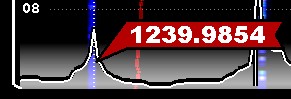
Right click and you'll get a small popup menu.
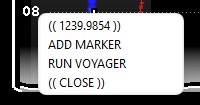
Select "ADD MARKER" and you'll get a new pin to the display, labeled as "UNID" by default.
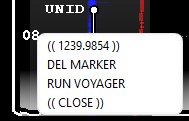
Note that you can start a VOYAGER run also from this menu: if you have used Jaguar's SCAN system, you may have already a lot of offset scans in your archives. If so, VOYAGER may find the time spot(s) where the signal around this offset is the strongest, compared to the other carriers on this frequency (see VOYAGER for more details) and you may solve the identity of this UNID without further monitoring.
You can also delete existing UNID markers (or any entry from the OFFSET.txt file) by right clicking the frequency where the pin exists, on the bottom of the SCOPE: instead of "ADD MARKER" you'll see the "DEL MARKER" menu item.