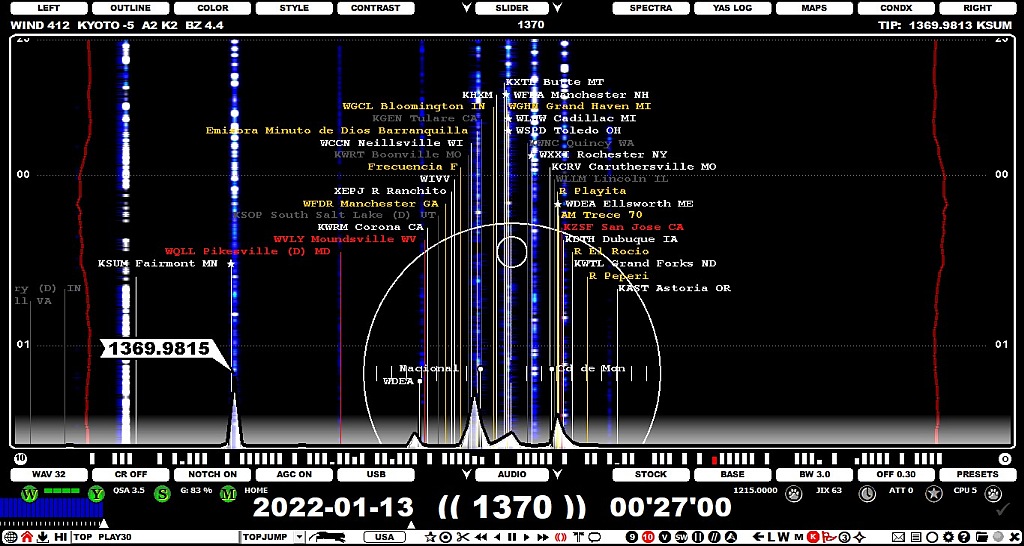
There are two types of offsets in JAGUAR: global ("public") and local ("private"). Global offsets are presented as FLAGS (see GUIDE > FLAGS for more details), local offsets are presented as short pins on the bottom of the graphics area (see GUIDE > MY OFFSETS for more details).
The global offsets consists of the offsets listed in "MWLI offsets list" and the offsets collected by JAGUAR users (and saved to the Kapsi server, which is the central server of all the JAGUAR services). The MWLI offsets are included the TURTLE database (see TURTLE for more details), the JAGUAR offsets are loaded and displayed dynamically from the server whenever needed.
When a new offset is observed, it is recommended that you share your offset observation with fellow DXers and log the new value to the system - the logging process has been made as easy as possible. Saving the offset observation locally is an additional option (see MY OFFSETS for the details).
At the moment we collect the offset data to our Kapsi server because we need services that the MWLI offsets list can not provide. If you want to log the offset also to the MWLI offsets list, you can use the standard MWLI services for that. Generally it would be optimal to keep all the global offset information in one place, hopefully this will be possible in the future.
The offsets can be displayed on the SPECTRA displays enabling the FLAGS from TOOLBAR > FLAGS and the offsets shown are based on the selected continent.
Offset monitoring/analysis/updates require that
If these two requirements are met, offsets can give extremely useful help in MW DXing.
If you notice that the current offset value on the flag is not on a correct position, just drag it to the correct place! Move the mouse cursor on the top of the flagpole (you'll see the station name as red) and drag the flagpole to the x-position which matches the new SPECTOR peak of the selected station. The new value is added to the system automatically (and visible to other JAGUAR users immediately). Your P-TAG is also updated as "LOGGED" (if the station is not yet tagged).

You can cancel the update by pressing ESC as long as you are tuned on the currently played frequency.
JAGUAR also offers an alternate way of updating the offset value. This is needed also for cases where there is no earlier offset observed (you can't "drag the flag"):
The following options can be useful while working with the offsets (see SETTINGS > OFFSETS):
OFFSET_BAR = YES
OFFSET_PEEK = YES
In addition, the color scheme of the FLAGS can be customized and the offset history (and range) can be shown on the SPECTRA display (see GUIDE > FLAGS for the details).