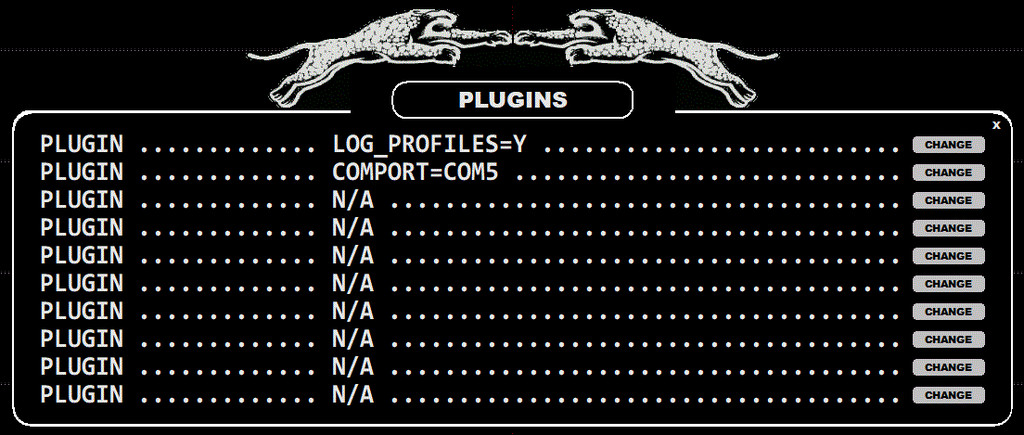
A number of miscellaneous dynamic settings and customizations can be set via SETTINGS > PLUGINS. PLUGINS are usually added by request, making it possible to tailor the GUI/functionality for individual usage needs
JAGUAR V8 supports the following PLUGIN parameters:
Below you will find the detailed descriptions of the PLUGIN parameters.
When the PLUGINS window is open, a new plugin can be added by clicking the "CHANGE" button on the right, typing the PLUGIN definition into the corresponding text box, and then clicking "SAVE". For example, the PLUGIN window can look like this:
BEACONS=fq1,fq2,fq3,...
In the LIVE mode the CONDX > CURRENT display shows the strongest overseas peak frequency (="DX PEAK"). Sometimes there can be NDB frequencies in your neighborhood that "steal" the peak value from the real overseas signals (for example in the Southern Finland the nearby Russian beacons are often the strongest frequencies on the MW10 channels). In these cases you can block those NDB frequencies from the DX PEAK enumerating them with this BEACONS option.
CATBOOK_FOLDER=path_to_some_folder
overrides your default TURTLE folder.
CATBOOK_QSL=N
If you set CATBOOK_QSL=N, you will get the full 80 characters for the audio clip name in CATBOOK, and the full path can be also included but you cannot use the QSL LINK anymore in CATBOX.
COMPORT=comport
Set a Windows COM port for Velleman/Devantech antenna relay control boards. For example, COMPORT=COM5 forwards antenna relay control commands to COM5.
DEFAULT_ATT=x
The default attenuation value for Perseus (the allowed values are: 0, 1, 2 and 3). This plugin overrides all the scheduled attenuation settings in MESTOR.
DRAG_SPECTRUM_HORZ=Y
By default the visible spectrum on the SPECTRA display can be dragged only vertically. If DRAG_SPECTRUM_HORZ is activated, dragging is possible also horizontally.
DUALMON=xresolution,yresolution
Show JAGUAR's main display on an alternative monitor. The desired X-resolution and Y-resolution must be given. These values may need to be trimmed from the default resolution values in order to get a full screen display. Also, DUALMON=xresolution,yresolution,INVERSE can be used to re-position JAGUAR on the "other side" of the main display. Note that INVERSE may not work in every situation.
FLAGS_ON_MAPS=Y
By default the offset flags are visible only on the SPECTRA display. If FLAGS_ON_MAPS is activated, the flags are visible also on the MAPS.
KEEP_SCAN_COPY=Y
By default each new FILESCAN deletes the earlier SCAN file. If KEEP_SCAN_COPY is activated, the previous SCAN file is saved for possible (user controlled) recovery.
LOG_PROFILES=Y
You can define a maximum of three log profiles. These profiles are useful if you want to make loggings to several publications with one single logging action. See GUIDE > LOG_PROFILES.
MEGAPOOL=Y
By default the file pool (= file names that JAGUAR keeps in memory) covers only one disk. If MEGAPOOL is activated, the system creates a larger file pool offering a quick access to all files on all disks that are plugged to the PC (or to disks that contain the same path name as used in the currently played name). The idea is to hide the disks and the "DX DAY" structure from the users: using the POOL FRAME (ALT-O) the user can navigate in files without knowing the physical location/folders/etc.
PANTS=two-different-recording-paths-separated-with-comma
Compare two recordings recorded at the same time. See details in GUIDE > PANTS.
PANTS_LABELS=label1,label2
When using the PANTS feature, you can rename the banner text shown on the current display (max 6 characters), for example the labels can be ANT290,ANT335 showing the antenna directions. If you have three disks in PANTS, use three labels.
PERSEUS_DITHER=Y | N
The internal dither function of the Perseus hardware is OFF by default. This improves sensitivity in low-signal-strength areas.
PERSEUS_PREAMP=Y | N
The internal amplifier of the Perseus hardware is ON by default.
POWERSAVE=HHMM UTC
The user-defined time in UTC for PC hibernation, HHMM must be replaced by desired time, e.g. POWERSAVE = 1410 UTC. Don't use this option if you have enabled the MESTOR controlled hibernation.
POWERPLAY=HHMM-HHMM
Special feature for the battery driven remote setups. If you use the MESTOR controlled hibernation feature (MESTOR > HIBERNATE WHEN NOT RECORDING), the wake up from the hibernation happens only for the scheduled REC times. However, using this POWERPLAY option, the user can define a time slot for waking the system up and keeping it running just for plain playback for a pre-defined time. When using a remote setup, it is typical that recordings are made during the night/morning hours and the files are reviewed using AnyDesk/TeamViewer/etc. during the evening hours. If so, the user can define for example POWERPLAY=1500-1800 as the time slot for studying the files.
QSL_ARCHIVE=path_to_some_folder
Your digital QSL archive folder, used by CATBOOK.
REDO_RESTART=Y
If there's a break/crash in the overnight recording and the automated restart/connection fails due to (potential) USB issue, this REDO_RESTART will retry the whole restart process until the Perseus connection finally succeeds (note: if USB (/disk/Perseus) is totally unavailable, this will cause an eternal restart loop. Use this with care, because normal power breaks etc. are handled correctly without this parameter.
SINGLE_JIX=Y
By default the JIX curve is displayed on both sides of the SPECTRA and YAS LOG displays. If SINGLE_JIX is activated, the JIX curve is shown only on the left edge.
WORKCHAIN=Y | N
This is for the hardcore power users: different WORKSETs can be started as scheduled. If you set WORKCHAIN=Y, the WORKCHAIN.txt file will be used for controlling the WORKSET timer. You must create this file manually and save it to the JAGUAR installation folder before JAGUAR is started. The file contains the parameter "WORKCHAIN=" followed by the WORKSET name and the letter ":" and the desired start time as HHMM; each such pair must be separated by a comma. You can schedule as many WORKSETs as needed; two or three being the usual situation.
The syntax for the contents of the line required in the WORKCHAIN.txt file is
WORKCHAIN = XXXXXX: HHMM, YYYYYY: HHMM, ZZZZZZ: HHMM
where XXXXXX, YYYYYY and ZZZZZZ are workset names (case-sensitive!), and each HHMM is the desired start time of the WORKCHAIN.
For example,
WORKCHAIN = MIDDLE_EAST: 1500, AFRICA: 1940, USA: 2345
means that the workset MIDDLE_EAST starts at 15:00 UTC, the workset AFRICA at 19:40 UTC, and the workset USA at 23:45 UTC.
WORKCHAIN corresponds to the "MESTOR plan" concept used in the earlier JAGUAR versions. Note that many changes in the operating environment (antenna switches, etc.) can already be handled by using the standard MESTOR scheduler. If the standard MESTOR services are not enough, the WORKCHAIN timer will cover all the needs that can be imagined.
XADJUST=x
Can be used with DUALMON for adjusting the exact position of the left edge of the JAGUAR display (JAGUAR's X-position is moved by x pixels to the left/right)