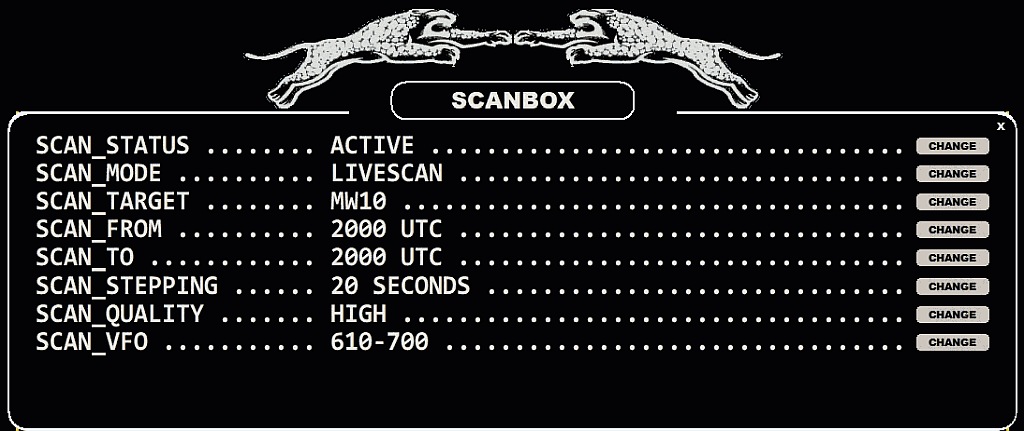
Offset detection/monitoring plays an important role in modern MW DXing as the "eyes have become as important as the ears in MW DXing". JAGUAR has several built-in tools for collecting exact offset data on the AM dial supporting 24/7 offset history collection for all MW10 or MW9 frequencies. The results can be used as a platform to analyze the frequencies and jump directly to the "hot spots" when such are found.
Offset detection/monitoring is implemented in SCANBOX which is always available in the background. SCANBOX can be used in automatic and manual modes (= LIVESCAN and FILESCAN).
LIVESCAN: If selected, JAGUAR performs an automatic offset analysis whenever the Perseus connection is active (LIVE MODE). Analysis can be done for desired MW frequencies: all frequencies using a stepping of 9 kHz or 10 kHz, or a VFO stepping, based on your location and/or preferences. The stepping and time range can be customized. LIVESCAN is not related to recordings in any way.
FILESCAN: If selected, JAGUAR collects the offset history from the recorded data.
Both LIVESCAN and FILESCAN are defined and started via SCANBOX, triggered by clicking the STATUSBAR > S button.
Detailed desciptions can be found in GUIDE > LIVESCAN and GUIDE > FILESCAN.
Important: If you define too low a SCAN_STEPPING value for LIVESCAN, your PC performance may suffer and the desired SCANs may not be produced in a timely fashion. For example, setting SCAN_STEPPING down to 8 SECONDS is possible, but it requires a "gaming PC" with a modern Intel i7 (or a corresponding) CPU. Normally, SCAN_STEPPING values of 10-30 SECONDS are acceptable for average setups. If you enable SCAN_QUALITY > LOW, you'll get a performance boost and you can use a lower SCAN_STEPPING value, but may get some spurious signals (false spectrum traces) to the spectrum if there are nearby powerhouses close to your QTH. However, in Lapland and other ideal rx areas, SCAN_QUALITY > LOW can be used.
The SCAN_TARGET value in SCANBOX can be changed either manually (using the CHANGE button) or by the system itself: you can create a scheduled change for it (see SETTINGS > MESTOR and the SCANTARGET parameter). In either case, the SCAN_TARGET always shows the currently active scan target.
If SCAN_TARGET > VFO is used, the user can restrict the frequencies analyzed. In addition to the standard frequency lists (frequencies separated by comma), users can also use frequency ranges (FREQ1-FREQ2), reserved word OVERSEAS and ITU-codes. These all can be mixed together, separated by comma. Here are some SCAN_VFO exmaples:
SCAN_VFO .............................. OVERSEAS
SCAN_VFO .............................. 549-1503,1575,1602
SCAN_VFO .............................. AFS,MOZ,KEN,MWI,945