
SCOPE is a convenient tool to monitor the signal strengths on all MW frequencies at the same time, either in the LIVE mode or in any ARCHIVE file. SCOPE can be also used for a direct jump to any desired frequency.
SCOPE can be displayed in two formats: the current signal power on each MW frequency
or the signal power history (last minutes) on each MW frequency (in the YAS LOG format)

The "O" button on the right end of SCOPE can be used for a quick view/opening of the playback files (more details in the POOL FRAME section).
SCOPE is enabled by default. You can toggle the MW9 and MW10 frequencies by clicking the "9 / 10 ball" on the left edge of SCOPE.
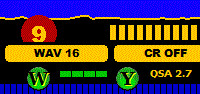
JAGUAR PRO ONLY: If you prefer the "YAS LOG" format in SCOPE, you can select it via SETTINGS > GRAPHICS > LOW_BAR > MINI YAS. If you do not need SCOPE, you can hide it via SETTINGS > GRAPHICS > LOW_BAR > OFF.
You can jump to any SCOPE frequency by clicking the corresponding bar.
Note that SCOPE uses a "quick'n'dirty" MW analysis, and there can be frequencies without signal power (bar) shown even if the frequency itself is open. These kind of situations happen if there is a strong powerhouse on a nearby frequency (normally 1 kHz away).