
JAGUAR offers a fast way to create frequency lists for all the MW frequencies in any selected country for direct tuning/scrolling.
In order to use the SEARCH function, SETTINGS > KEYBOARD > S-KEY > SEARCH (default) is required.
Pressing the keyboard key "S" shows an empty banner
and if the user wants to show all the MW stations/frequencies for example in Nepal, typing NPL and pressing ENTER on the keyboard does the job.

The list is shown on the upper left corner of the display:
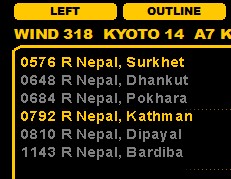
and if the SLIDER is open, the list will be also seen on the TURTLE window.
In addition, a new VFO list (covering these frequencies) is created automatically and JAGUAR activates the VFO stepping for this frequency list.
The user can now tune to each frequency serially (using the standard frequency scrolling features), and also jump directly to any frequency listed on the output list by clicking the desired row.
Pressing ESC clears the SEARCH output list, but keeps the VFO stepping active (so all the stations on the tuned frequencies are shown in TURTLE). The user can return to the standard 9/10 kHz stepping by clicking TOOLBAR > 9 or TOOLBAR > 10.