On MW, frequency tuning is normally made in steps of 9 kHz or 10 kHz. When either of these is selected, JAGUAR's frequency scroll (the mouse wheel and left/right arrow keys) use the selected stepping while tuning. In addition to these two base stepping modes, sometimes it is also handy to use "memory banks" as an alternative stepping. These memory banks (frequency lists) are supported in form of "VFOs".
By default, JAGUAR uses the frequency list defined in the WORKSET window (see GUIDE > WORKSET > VFO_FREQS for more details). The default frequency list in the installation template is 1230, 1240, 1340, 1400, 1450, 1490, i.e. the graveyard frequencies. You can override this list, and in addition user-defined frequency lists can be added to the system (see DIALS for more information).
Pre-defined VFO frequency lists can be used efficiently for finding parallel programs or checking the signal levels of the indicator stations from specified areas.
Note: DIALS and SCANS are not available in JAGUAR LITE.
TOOLBAR > VFO
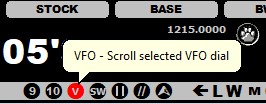
Click TOOLBAR > VFO or select VFO from TOPMENU > VFO to activate the VFO-based frequency stepping. When the VFO-based frequency stepping is active, the VFO icon on TOOLBAR is red. In addition, the name of the currently active frequency list (VFO) is shown in a banner on the top of the display.
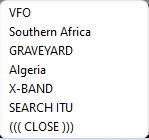
If the user has defined one or more DIALS, clicking TOOLBAR > VFO button opens a popup menu for selecting the desired frequency list. On the top there is the default VFO, then there's the list of the defined DIALs and the last item is the "SEARCH ITU" option. "SEARH ITU" allows creating a dynamic frequency list based on any given ITU code (the frequency list will cover all MW frequencies in the selected country). This "SEARCH ITU" function uses JAGUAR's SEARCH function (see DIALS for more information).