 on STATUSBAR twice (the first click jumps to a file where the nearest TOH/BOT spot is found and sets the loop start, the next click sets the end of the loop)
JAGUAR offers several ways of creating audio LOOPs to constantly repeat a small segment of audio:
on STATUSBAR twice (the first click jumps to a file where the nearest TOH/BOT spot is found and sets the loop start, the next click sets the end of the loop)Audio LOOPs are displayed on PLAYBAR with special flag markers.
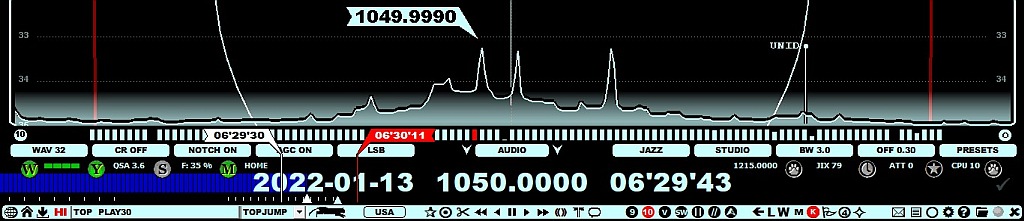
The LOOP marker positions can be changed by moving the mouse over the marker flag. The flag color turns to red when ready for repositioning, and scrolling the mouse or pressing the left/right arrow keys. You can also drag the LOOP markers to the desired positions.
The default TOHBOTLOOP is set between XX'59'40-XX'00'05 (for TOH LOOP) or XX'29'50-XX'30'10 (for BOT LOOP). These times can be customized as shown below.
You can release the audio loop (and their markers) by pressing the UP ARROW key once again, clicking TOOLBAR > LOOP once again, pressing SPACEBAR once again, clicking the CLOCK icon once again, or simply by pressing the ESC key.
If you have an audio LOOP defined, pressing the C key (= CLIPPER) will create an audio clip from the segment defined by the LOOP markers. If you instead click TOOLBAR > SCISSORS, you will get a small popup menu, from which you can select either CHOP (see CHOP for details) or CLIPPER.
An additional AUTOLOOP function is available: SETTINGS > LOOPS > AUTOLOOP. If enabled, when JAGUAR opens an ARCHIVE file that contains a TOH or BOT timespot, TOHBOTLOOP will be set automatically.
You can customize the default LOOP settings in SETTINGS > LOOPS as follows:
TOH .............. starttime,endtime
Set an automatic audio loop around the top of the hour. The default TOH LOOP is from XX:59:40 to XX:00:05. You can increase/decrease the duration. For example, TOH .... XX:59:30-XX:00:30 overrides the default TOH LOOP with new values ranging from XX:59:30 to XX:00:30.
BOT .............. starttime,endtime
Set an automatic audio loop around the bottom of the hour. The default BOT LOOP is from XX:29:25 to XX:30:05. You can increase/decrease the duration. For example, BOT .... XX:29:30-XX:30:30 overrides the default BOT LOOP with new values ranging from XX:29:30 to XX:30:30.
WWI .............. X seconds
Pressing SPACEBAR creates a "What Was It" audio loop. The default duration is 10 seconds but you can change this value. The WWI values between 0 and 10 seconds are allowed. 0 (zero) means that WWI loops are disabled, i.e. SPACEBAR will be ignored.
If you enable SETTINGS > LOOPS > PAINT_LOOP > YES, you can also use the mouse cursor for painting the loop area on PLAYBAR.